Imagine talking to a customer for the first time. Every. Single. Week.
You ask the same questions. They give the same answers. You make the same suggestions. They nod politely and wonder if you have any idea who they are.
You would lose that customer fast. Any human salesperson who operated this way would be fired or retrained within a month.
Yet this is exactly how most AI sales systems work today.
They generate responses without context. They send follow-ups without reading previous conversations. They score leads without understanding relationship history. The output looks professional — well-written subject lines, properly formatted templates, perfect grammar — but underneath, the system has no idea who it is talking to.
The missing piece is not more training data or a better language model. It is Customer Memory — the ability to remember, understand, and act on everything that has happened in a relationship.
1. Why Sales Relationships Depend on Memory
Think about the best salesperson you have ever worked with or observed. What made them good? It was probably not their pitch. Or their product knowledge. Or their closing technique. Those things matter, but they are table stakes. What set them apart was something else: they remembered things. They remembered that the prospect's daughter just started college when they asked about budget planning cycles. They remembered that the technical lead preferred detailed specs while the VP wanted one-page summaries. They remembered that the customer mentioned a competing product three months ago and that the objection was about integration, not price. They remembered the buying timeline shifted from Q3 to Q4 because of an internal reorg. Memory is what turns a transactional interaction into a relationship. Customers trust people who know them. They engage with people who understand their context. They buy from people who do not waste their time starting from zero every conversation. This is not warm and fuzzy relationship theory. It is observable behavior. Studies of B2B buying patterns consistently show that buyers prefer vendors who demonstrate understanding of their business over those who offer the lowest price or the fanciest deck. Understanding comes from paying attention over time. Paying attention over time requires memory.
2. The Problem With Memoryless AI Sales Agents
The first generation of AI sales tools solved real problems. Writing emails takes time. Scheduling follow-ups is tedious. Personalizing outreach at scale is hard. AI handled all of this well enough to create an entire category of products. But look at what these tools actually do: They generate text. Give them a prospect's name and company, and they produce a perfectly reasonable cold email. The email will be grammatically correct, professionally toned, and possibly even relevant to the prospect's industry. But the AI does not know whether you already talked to this person. It does not know if they responded to your last email or ignored it. It does not know if they are in the middle of a buying process or completely uninterested. They summarize individual conversations. Some tools can take a call transcript or email thread and produce a summary. Useful, but isolated. The summary lives in one place and does not connect to anything else. Next week's conversation starts fresh. They automate repetitive tasks. Send sequence step three on day seven. Move the deal stage forward when the prospect replies. Set a reminder for thirty days. All valuable, all mechanical, none of requiring any understanding of the relationship itself. What these tools cannot do is answer questions like: - Why did this customer go quiet after being highly engaged for two months? - Which of my fifty open opportunities is actually worth pursuing right now? - What should I discuss with this account that we have not already covered? - Is this customer's engagement pattern normal for them, or is something changing? These are not advanced edge cases. These are the questions salespeople ask themselves every day. And current AI tools stay silent on all of them because they have no memory to draw from.
3. What Is Customer Memory?
Customer Memory is the ability of an AI Sales Agent to retain and understand customer context across conversations, interactions, and relationship history. That definition sounds simple. The implementation is where things get interesting because Customer Memory is not a single thing — it is a layered capability that covers different types of information at different levels of depth: Interaction history. Every email sent and received. Every meeting held. Every call made. Every support ticket filed. Not stored as disconnected records but as a continuous narrative of the relationship. Conversation meaning. Not just what was said, but what it meant. When a customer mentioned "budget concerns" in March and then "timeline flexibility" in June, Customer Memory recognizes these as related signals — not two separate data points but parts of an evolving picture. Customer preferences. How they like to communicate. When they typically respond. Who else is involved in decisions. What terminology they use. What topics interest them and what bores them. Business context. Their industry, company size, growth stage, competitive landscape, organizational structure, strategic priorities. The stuff that lives in a good rep's head but rarely makes it into CRM fields. Engagement patterns. How their responsiveness changes over time. Which channels they actually use versus which ones they ignore. Whether their engagement spikes around certain events (product launches, fiscal years, leadership changes) or seems random. When all of these layers work together, the result is something qualitatively different from a CRM record. A CRM tells you what happened. Customer Memory helps you understand what it means and what to do about it.
4. Customer Memory vs Traditional CRM
| Traditional CRM | Customer Memory | |
|---|---|---|
| **Core function** | Store information | Create understanding |
| **What it holds** | Contacts, accounts, activities, deals, pipeline stages | Conversation meaning, relationship context, engagement patterns, behavioral signals |
| **How it organizes data** | Records and fields (structured, schema-defined) | Continuous relationship narrative (unstructured + structured) |
| **Relationship view** | Snapshot in time (last activity date, deal stage) | Evolution over time (how the relationship has changed) |
| **Action output** | Reports, pipelines, activity lists | Contextual recommendations (who/when/what/why) |
| **Key question answered** | "What did we do?" | "What should we do next and why?" |
| **Maintenance burden** | High (data entry, field updates, logging) | Low (captures from existing interactions) |
| **Value scales with** | Data completeness | Relationship depth and time |
The distinction matters more than the feature comparison suggests. CRM is a system of record. It answers questions like: How many opportunities do we have? What is our pipeline value? When was the last contact with this account? These are important questions. Companies need answers to them. But CRM was designed in an era before AI could read and reason over unstructured data. Its architecture assumes humans will do the interpreting. The CRM stores the raw materials; the salesperson is supposed to look at them and figure out what they mean. Customer Memory flips this. Instead of storing data for humans to interpret, it builds an ongoing understanding of each relationship that the AI can reason about directly. The AI knows that a customer who stopped responding to emails but started opening product update notifications might be in evaluation mode — not because someone tagged the account that way, but because the pattern matches behaviors the AI has seen across hundreds of similar relationships. CRM stores information. Customer Memory creates understanding. You need both, but they serve fundamentally different purposes.
5. How Customer Memory Creates Better Sales Actions
Understanding a relationship is valuable on its own. But the real payoff comes when that understanding translates into action — specifically, into better actions than you would take without it. This is where Relationship Intelligence enters the picture. Relationship Intelligence is what happens when Customer Memory gets put to work: the AI analyzes patterns across all your relationships and produces recommendations that are specific to each customer, each moment, and each situation. Here is what that looks like in practice: Who to contact. Not "contact everyone who has not heard from us in 30 days." Instead: contact Sarah at Acme Corp because her engagement pattern shows she typically re-engages after a quarter of silence, and her company just posted three engineering jobs that suggest a new project is staffing up. When to contact. Not "send the Tuesday morning sequence." Instead: wait until Thursday for this particular customer because their response data shows they clear inbox backlog mid-week, and sending now would bury your message under older unread mail. What to discuss. Not "check in and see how things are going." Instead: reference the integration challenge they mentioned in February, note that your product released an API update last week that addresses it, and ask whether that changes their timeline. What action creates value. Not "move to the next step in the sales process." Instead: this customer has been in evaluation for six weeks with no decision — the highest-value action right now is not another product demo but a conversation with a peer reference from a similar company. These recommendations add up to something called Next Best Action — the single most impactful thing you could do for each relationship at any given moment. Not a generic best practice. Not a playbook step. A specific, contextual recommendation grounded in everything the AI knows about that customer and everyone like them.
6. SalesRuns: AI Customer Engagement Agent Powered by Customer Memory
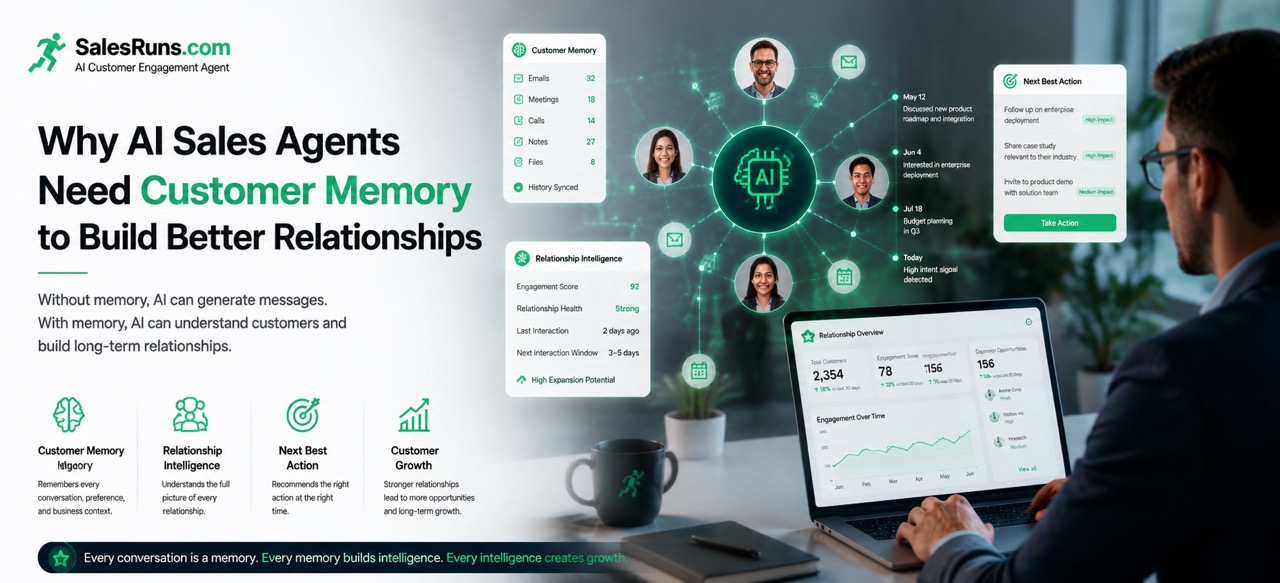
SalesRuns is an AI Customer Engagement Agent designed to help sales teams build stronger customer relationships at scale. The platform combines three capabilities into a unified system: Customer Memory captures every interaction across email, WhatsApp, Telegram, LINE, Slack, Discord, WeChat, and other channels. It builds a continuous, evolving understanding of each customer relationship — not as disconnected records but as a coherent narrative that grows richer with every conversation. Relationship Intelligence analyzes that memory to identify patterns, detect signals, and understand where each relationship stands. It answers questions like: Is this account warming up or cooling down? What changed since our last interaction? Which stakeholders are engaged and which ones have gone quiet? Next Best Action translates that intelligence into specific recommendations: who to reach out to, when, about what, and through which channel. Every recommendation is grounded in actual relationship data, not generic playbooks. Together, these three capabilities let sales teams do four things that were previously impossible at scale: - Remember every relationship. No customer falls through the cracks because someone forgot the last conversation or left the team. - Understand every conversation. The AI reads meaning, not just words. It knows what was discussed, what was decided, and what is still open. - Identify opportunities. Expansion signals, re-engagement windows, stakeholder shifts — the AI spots them as they emerge, not months later during a quarterly review. - Continuously engage customers. Not blast campaigns. Not generic check-ins. Timely, relevant touches that feel personal because they are informed by actual relationship history.
This is the Customer Memory Flywheel. Every interaction feeds memory. Memory powers intelligence. Intelligence drives action. Action produces engagement. Engagement generates growth. And growth creates more interactions that make the flywheel spin faster. The key insight is that every interaction makes future interactions smarter. A conversation today improves the quality of next month's recommendation. A deal closed this quarter teaches the AI something about what works with similar customers. The system compounds knowledge the way compound interest compounds returns — slowly at first, then dramatically over time.
Practical Examples: Customer Memory in Action
Example 1: The six-month-old conversation. A customer discussed a product upgrade in a call back in February. The deal did not close — budget timing, they said. Your rep noted it in CRM and moved on to other opportunities. Six months later, that same customer opens three product update emails in a row and visits your pricing page twice. A memoryless AI sees a standard engagement spike and fires off a generic "saw you were interested" follow-up. An AI with Customer Memory recognizes this person. It knows about the February discussion, the budget objection, the timing issue. It knows six months have passed — roughly when many companies enter new fiscal planning cycles. It recommends a message that references the original conversation, acknowledges the timing constraint, and offers to revisit the conversation with updated pricing or packaging options. The difference between these two approaches is the difference between another deleted email and a reopened conversation.
Example 2: The shifting business need. A mid-size customer has been using your product steadily for eighteen months. Nothing dramatic — logins are consistent, support tickets are low, renewals happen on time. A typical CRM flags this account as "healthy" and moves on. But Customer Memory notices something else. The customer's support tickets used to be about basic setup questions. Over the past three months, they have shifted to questions about advanced features, integrations with other tools, and API usage. Their main contact — always the same person — started CC'ing a colleague from the engineering team. These are not red flags. They are green lights. The customer is not having problems; they are expanding their use case. Customer Memory flags the account for expansion outreach and recommends discussing the advanced features they have been researching, with the engineer included in the conversation. Without memory, this signal sits invisible in scattered support tickets until someone manually pieces it together. By then, the customer may have already found another solution.
Example 3: The multi-stakeholder account. You sold into a large enterprise account nine months ago. The deal involved five people: an economic buyer, a technical evaluator, an end-user champion, a procurement contact, and someone from legal who showed up at the last minute. Since the deal closed, your team has mostly talked to the champion. The economic buyer signed the renewal without a meeting. The technical evaluator submitted one support ticket. Procurement and legal went silent. A CRM shows one "active" contact and four inactive ones. Standard practice says focus on the active one. Customer Memory tells a different story. It knows that the economic buyer's brief renewal approval — no meeting, no negotiation — is actually a pattern: this person trusts the champion and delegates routine decisions. Good news, but also a risk: if the champion leaves, the relationship has no backup. It knows the technical evaluator's support ticket was unusually detailed, suggesting hands-on usage that could indicate either deep satisfaction or emerging frustration — worth a check-in. It knows procurement went silent because the contract is on auto-renewal, but that the procurement contact's LinkedIn profile shows they recently attended a vendor consolidation conference — a potential signal that someone is looking at alternatives. From this, the AI recommends three actions: strengthen the relationship with a second stakeholder as insurance against champion departure, have a technical check-in with the evaluator, and schedule a proactive value review with the economic buyer before procurement starts shopping around. Three specific actions. Three specific reasons. One account. That is what Customer Memory looks like when it is working.
Key Takeaways
- Productivity automation (email writing, task scheduling, sequence management) is necessary but insufficient for building lasting customer relationships. The next frontier is not doing more — it is understanding better.
- Customer Memory is the foundational capability that separates message-generating tools from relationship-building AI agents. Without it, every interaction starts from zero.
- Traditional CRM stores information; Customer Memory creates understanding. Both are needed, but they serve different purposes and require different architectures.
- Relationship Intelligence transforms stored memory into actionable insight — answering not just "what happened" but "what should we do next and why."
- Next Best Action is the output that matters most: specific, contextual recommendations for each relationship at each moment, grounded in actual interaction history rather than generic playbooks.
- The Customer Memory Flywheel means every interaction improves future interactions. Knowledge compounds over time, creating advantages that grow stronger the longer you use the system.
Conclusion
The first generation of AI sales tools asked: How can we help salespeople do more? The answer was productivity automation. Write more emails. Send more follow-ups. Contact more prospects. Scale the top of the funnel. And it worked — up to a point. Teams got faster. Inboxes got fuller. Response rates stayed flat or declined. The next generation asks a different question: How can we help salespeople build better relationships? That question leads somewhere different. It leads to Customer Memory — not as a feature checkbox but as the core architecture of how AI engages with customers. It leads to systems that understand relationships, not just process transactions. It leads to recommendations grounded in actual history, not generic frameworks. SalesRuns is built around this idea. An AI Customer Engagement Agent that remembers every conversation, understands every relationship, and recommends the right action at the right time. Not more messages. Better relationships. The teams that make this shift will notice something within the first few months: their customers start responding differently. Not because the emails are better written — though they might be. But because the emails reflect actual understanding. Because the timing reflects actual context. Because the whole interaction feels like it is coming from someone who knows them. Because, increasingly, it is.